
Nano Banana 2.1 is Google’s image generation and editing model for creating new visuals and revising existing images with text instructions. It is an update to Nano Banana 2, with Google reporting improvements in reference consistency, instruction following and text rendering. For creators, the useful question is how those capabilities translate into a repeatable workflow. Google’s model documentation describes the underlying model.
This guide explains the published evidence, reads two supplied examples closely, and gives you prompts for your own projects. It also separates Google’s native capabilities from the controls currently available on ImagineGo.
Research checked October 9, 2026. This is a documentation-based guide, not an ImagineGo performance benchmark. The illustrated examples were supplied for this article; their original prompts, settings and rejected attempts were not provided. The prompt templates below are original suggestions and have not been used to reproduce those images.
What is Nano Banana 2.1?
Google identifies the model as gemini-nano-banana-2.1. Its release schedule lists October 6, 2026 as the release date. Google DeepMind’s model card describes it as based on Gemini 3.6 Flash. These identifiers help distinguish it from Nano Banana 2 and Nano Banana Pro when comparing documentation or products. Google’s release schedule and DeepMind’s model card provide the primary references.
An image generation workflow starts with a written brief. An editing workflow adds visual references and instructions about what to preserve or change. The second approach is particularly relevant when a recognizable character, garment or product must carry through a series of assets.
What changed from Nano Banana 2?
Google’s documentation highlights better image quality across 1K, 2K and 4K, improved text and infographic layouts, stronger continuity through successive edits, and fixes for tiling artifacts in extreme panoramic formats at 2K and 4K. These are published improvement claims, rather than outcomes independently measured in this guide. Google’s feature documentation describes the changes.
Google also publishes comparative evaluations. In its October model card, Nano Banana 2.1 with Thinking scores 1106 ± 14 for multi-character consistency, compared with 978 ± 10 for Nano Banana 2 with Thinking. For general editing, the corresponding scores are 1026 ± 12 and 938 ± 11. Google describes side-by-side human evaluation using Elo. These scores summarize preference under its evaluation setup; they are not percentages of correct outputs or scores measured in ImagineGo. DeepMind’s evaluation results contain the methodology and table.
That evidence makes reference-driven editing a useful area to investigate. It does not establish that a particular face, outfit or product will survive every transformation. For an existing Nano Banana 2 workflow, compare versions on saved briefs and the details your project cannot afford to lose.
Reference example: recognizable characters across a story
The first supplied example places three references on the left: a character wearing a hat, a small orange creature and a sheep. Six scenes on the right show them working around a forest treehouse and later gathering inside a cabin.
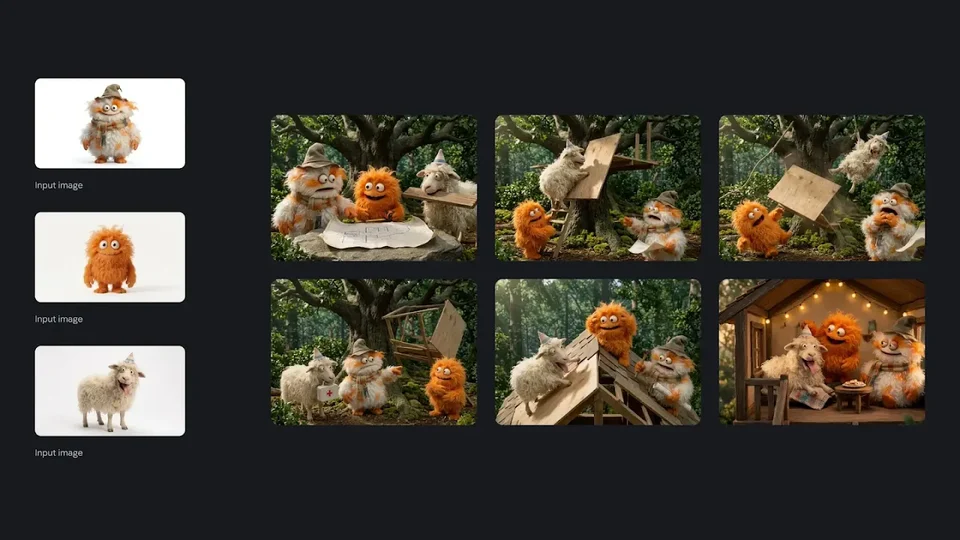
Supplied illustrative example. The collage demonstrates a sequence of scenes; it does not establish that one request produced six separate images.
The useful visual observation is continuity of recognizable cues: the hat, orange fur and pale sheep remain easy to identify while the activity and framing change. A collage cannot reveal the number of attempts or how often those details drifted. Treat it as an example of the intended creative workflow, rather than a success-rate measurement.
For your own sequence, create a short character brief before writing the scene prompt. Record silhouette, colors, distinctive accessories and relative scale. Then change the action and setting while restating the essential identity cues.
Prompt template for one story scene
Upload your character references separately and adapt the descriptions to match them:
Create one cinematic story illustration using the uploaded character references.

The hat-wearing character, small orange creature and pale woolly sheep are
planning a treehouse around a wooden table in a forest clearing.

Preserve each character's recognizable face, silhouette, fur or wool texture,
colors and accessories. Keep the orange creature smaller than the other two.
Show all three clearly, with no extra characters.

Use a medium-wide view, soft afternoon light and a tactile handmade visual style.
Generate one scene, not a collage or storyboard sheet. Do not add text.
For a later frame, replace the planning activity with one specific action, such as carrying a plank. Keep the approved references available instead of relying on the written description alone. Review face shape, accessory placement and relative size before continuing the sequence.
Reference example: multiple people in one composition
The second example places appearance and clothing reference collages beside a group scene built around colorful walls, stairs and platforms. The final image combines several people into a shared architectural setting.
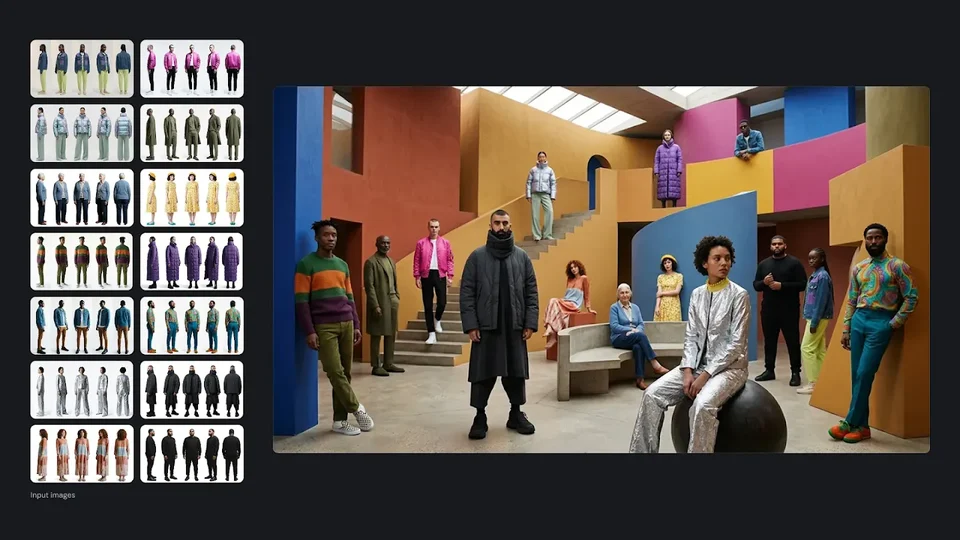
Supplied illustrative example. Reference tiles are not a count of accepted upload files, and the number of visible people is not a guarantee of identity preservation.
The composition illustrates more than placing subjects side by side. The people occupy different depths, some stand and others sit, and the architectural forms organize the group. When judging a similar output, examine whether faces remain recognizable, garments retain their defining shapes, feet meet the floor, and foreground subjects remain larger than background subjects.
A useful way to reduce ambiguity is to assign each reference a role. Separate instructions for identity, clothing, setting and composition. If a reference contains several views of one person, explain that they describe the same subject rather than additional people.
Prompt template for a controlled group scene
Start with a small group and adapt the reference descriptions to your uploaded files:
Create one editorial group portrait using the uploaded references.

The person in the black coat stands near the center in the foreground.
The person in the silver outfit sits on a dark rounded seat to the right.
The person in the purple coat stands on an upper platform in the background.

Preserve their faces, hairstyles, clothing colors and garment shapes.
Do not exchange faces or outfits between subjects and do not duplicate anyone.

Place them in a colorful architectural courtyard with stairs and geometric walls.
Use one coherent camera perspective, soft daylight, believable contact shadows
and a balanced composition. Keep every requested subject clearly visible.
This template provides a testable starting point, not the prompt used for the supplied image. Add more subjects only after checking the simpler composition. For photographs of real people, obtain permission to use their likenesses and avoid presenting a generated scene as a record of an event that happened.
Google’s model capabilities and ImagineGo’s controls
The model’s documented capability and a website’s available controls are different things. Google lists up to 14 reference images, search grounding and configurable Thinking levels for its native model. ImagineGo’s current Nano Banana 2.1 workflow accepts up to 10 reference images and does not expose search grounding or a Thinking selector. Google’s native model documentation and ImagineGo’s model page describe their respective surfaces.
The following are ImagineGo’s current settings, checked on October 9, 2026:
| Setting | Available on ImagineGo |
|---|---|
| Workflows | Text-to-image and image-to-image |
| Reference uploads | Up to 10 JPEG, PNG or WebP images |
| Maximum input image size | 30 MB per image |
| Prompt length | Up to 20,000 characters |
| Resolution | 1K, 2K or 4K |
| Aspect ratios | 15 choices, including auto, 16:9, 9:16, 4:1 and 8:1 |
| Output format | JPG or PNG |
| Initial settings | auto aspect ratio, 1K resolution, JPG output |
The live page and current input contract are the basis for this table. Recheck the generation controls before preparing a large set of references.
Do not assume a six-panel example means the interface provides batch story generation, or that a multi-person collage guarantees the same result for every subject. Describe the task you want the available workflow to perform.
How much does Nano Banana 2.1 cost?
ImagineGo currently charges 3 credits at 1K, 5 at 2K and 8 at 4K per generation. These are ImagineGo credits, not Google API billing units. The amount shown in the generator is the quote to check before submitting. ImagineGo’s current model pricing lists the three tiers.
For developers considering direct Google access, the Gemini API pricing page currently lists these Standard image-output equivalents:
| Resolution | Google Standard image-output equivalent |
|---|---|
| 1K | $0.0336 |
| 2K | $0.0504 |
| 4K | $0.113 |
Google also charges for input and text or Thinking output, so image-output figures alone are not a complete request-cost estimate. Batch has a separate price schedule. These amounts were checked on October 9, 2026 against Google’s API pricing page; they should not be converted into ImagineGo credits.
A practical budgeting approach is to explore composition at 1K, then generate a larger version once the brief is settled. Moving to 2K or 4K creates a new generation to inspect; it should not be treated as a promise of an identical higher-resolution copy. The useful cost metric is the number of attempts needed for an acceptable asset. See ImagineGo’s pricing options when choosing how to fund those iterations.
Limitations to consider before using an image
DeepMind lists remaining weaknesses in small text and long passages, imperfect character consistency, left/right localization, factuality and 3D reasoning. It also notes occasional slowness or timeouts. Improved benchmark results therefore do not remove the need to review outputs. The model card’s limitations section is the primary source.
For production work, use a review process tied to the task:
- Portraits and character art: compare facial proportions, signature accessories and silhouettes against the references.
- Fashion and products: check seams, closures, labels, logos and structural details that distinguish the item.
- Posters and infographics: proofread every visible word and independently verify factual statements. Add critical typography in a design editor when exact rendering is essential.
- Group scenes: inspect hands, overlapping bodies, feet, contact shadows and placement instructions.
A sharper image can make an error easier to see without correcting it. Choose resolution for the intended use, then judge identity, geometry and wording separately. No generation-time guarantee or independent ranking is claimed in this guide.
A practical starting workflow
- Define one deliverable. Write down whether you need a new image, a localized edit or a scene containing specified subjects.
- Choose informative references. Prefer clear views of the features you need to preserve. Explain the role of each upload.
- Separate preservation from change. Specify the identity, garment or object details that should remain stable, then describe the requested modification.
- Review one composition first. Make the task manageable before expanding the scene or building a longer sequence.
- Change one instruction at a time. This makes a failure easier to diagnose than rewriting the entire brief between attempts.
- Select the final output tier and inspect again. Confirm the generator’s quote, then review the new image before downloading or publishing it.
For a precise clothing edit, a short preservation clause can be more useful than a long style paragraph:
Change only the jacket to a yellow raincoat with realistic coated fabric,
visible seams and dark snap buttons. Preserve the person's identity,
hairstyle, expression, pose, hand positions, background and lighting.
Do not add a logo or change other garments.
This is an original prompt suggestion. Its usefulness should be evaluated on your own authorized reference image rather than inferred from the example galleries.
Try Nano Banana 2.1 on ImagineGo
Nano Banana 2.1 is worth evaluating when recognizable subjects and controlled changes are central to your image brief. Start with a clear reference, a specific instruction and a small number of details to protect. Judge the result against those requirements before investing in a larger scene or a full sequence.
Open Nano Banana 2.1 on ImagineGo to choose text-to-image or image-to-image, upload your references, and review the current resolution options and credit cost before generating.