Skip to content
imagineGo.ai

free ai Sprite Sheet Generator

Create pixel characters from a prompt. Preview 4-direction walk cycles and download a transparent sprite sheet with 32×32 frames.

Create your sprite sheet

Browse examples ↗
0/1200

Focus on one character, their outfit and 2–3 colors. The 4×4 layout is added automatically.

Try a prompt:

5 points per sheet

View generation history ↗
Red-plume knight128 × 128 PNG
Four rows of character sprites facing down, left, right and up
4×4 sheet · 32×32 frames

Walk preview

Generated with the same sprite model used by this tool. Results can vary, and some frames may need cleanup.

Sprite Sheet Generator examples & prompts

Compare six real outputs from the sprite model, from metal armor and purple robes to fur, jelly and mechanical parts. Preview the walk cycles or try a prompt.

01

Red-plume knight

Red-plume knight
4×4 sheet · 32×32 frames

Walk preview

CHARACTER PROMPT · ENGLISH

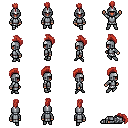
A pixel art spritesheet of a medieval knight wearing metal armor and a helmet with a red plume.

View full prompt

A pixel art spritesheet of a medieval knight wearing metal armor and a helmet with a red plume. The spritesheet is a 4 by 4 grid of four rows of frames - first row is 3 walking frames facing down and 1 frame both arms raised, second row is 3 walking frames facing left and 1 frame jumping left, third row is 3 walking frames facing right and 1 frame jumping right, fourth row is 3 walking frames back view facing up and 1 frame lying on floor.
Original image ↗
02

Red-haired witch

Red-haired witch
4×4 sheet · 32×32 frames

Walk preview

CHARACTER PROMPT · ENGLISH

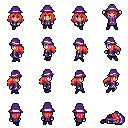
A pixel art spritesheet of a witch with long red hair and blue eyes, wearing a purple hat and robes trimmed with white and light purple colors.

View full prompt

A pixel art spritesheet of a witch with long red hair and blue eyes, wearing a purple hat and robes trimmed with white and light purple colors. The spritesheet is a 4 by 4 grid of four rows of frames - first row is 3 walking frames facing down and 1 frame both arms raised, second row is 3 walking frames facing left and 1 frame jumping left, third row is 3 walking frames facing right and 1 frame jumping right, fourth row is 3 walking frames back view facing up and 1 frame lying on floor.
Original image ↗
03

Gray werewolf

Gray werewolf
4×4 sheet · 32×32 frames

Walk preview

CHARACTER PROMPT · ENGLISH

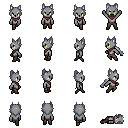
A pixel art spritesheet of a werewolf with light gray fur and yellow eyes, wearing a red scarf around his neck, and brown leather pants.

View full prompt

A pixel art spritesheet of a werewolf with light gray fur and yellow eyes, wearing a red scarf around his neck, and brown leather pants. The spritesheet is a 4 by 4 grid of four rows of frames - first row is 3 walking frames facing down and 1 frame both arms raised, second row is 3 walking frames facing left and 1 frame jumping left, third row is 3 walking frames facing right and 1 frame jumping right, fourth row is 3 walking frames back view facing up and 1 frame lying on floor.
Original image ↗
04

Green slime

Green slime
4×4 sheet · 32×32 frames

Walk preview

CHARACTER PROMPT · ENGLISH

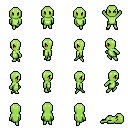
A pixel art spritesheet of a small round lime-green slime monster with two amber eyes, a glossy translucent jelly body and a wide uneven base, no clothing and no humanoid arms or legs.

View full prompt

A pixel art spritesheet of a small round lime-green slime monster with two amber eyes, a glossy translucent jelly body and a wide uneven base, no clothing and no humanoid arms or legs. The spritesheet is a 4 by 4 grid of four rows of frames - first row is 3 walking frames facing down and 1 frame both arms raised, second row is 3 walking frames facing left and 1 frame jumping left, third row is 3 walking frames facing right and 1 frame jumping right, fourth row is 3 walking frames back view facing up and 1 frame lying on floor.
Original image ↗
05

Skeleton warrior

Skeleton warrior
4×4 sheet · 32×32 frames

Walk preview

CHARACTER PROMPT · ENGLISH

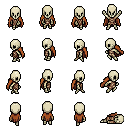
A pixel art spritesheet of a tall bony skeleton warrior with an oversized ivory skull, hollow black eye sockets, a tattered burnt-orange cape, a narrow rusty breastplate, an exposed ribcage and thin bone limbs.

View full prompt

A pixel art spritesheet of a tall bony skeleton warrior with an oversized ivory skull, hollow black eye sockets, a tattered burnt-orange cape, a narrow rusty breastplate, an exposed ribcage and thin bone limbs. The spritesheet is a 4 by 4 grid of four rows of frames - first row is 3 walking frames facing down and 1 frame both arms raised, second row is 3 walking frames facing left and 1 frame jumping left, third row is 3 walking frames facing right and 1 frame jumping right, fourth row is 3 walking frames back view facing up and 1 frame lying on floor.
Original image ↗
06

Clockwork automaton

Clockwork automaton
4×4 sheet · 32×32 frames

Walk preview

CHARACTER PROMPT · ENGLISH

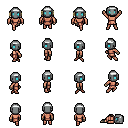
A pixel art spritesheet of a clockwork automaton with a round copper torso, thin jointed brass arms and legs, a small square head with a single cyan eye and a winding key on its back.

View full prompt

A pixel art spritesheet of a clockwork automaton with a round copper torso, thin jointed brass arms and legs, a small square head with a single cyan eye and a winding key on its back. The spritesheet is a 4 by 4 grid of four rows of frames - first row is 3 walking frames facing down and 1 frame both arms raised, second row is 3 walking frames facing left and 1 frame jumping left, third row is 3 walking frames facing right and 1 frame jumping right, fourth row is 3 walking frames back view facing up and 1 frame lying on floor.

Original image ↗

Generated with the same sprite model used by this tool. Results can vary, and some frames may need cleanup.

Sprite Sheet Generator for original pixel characters

Create pixel characters from a prompt. Preview 4-direction walk cycles and download a transparent sprite sheet with 32×32 frames.

How to use Sprite Sheet Generator

Describe one original character

Start with one character’s silhouette, clothing and two or three defining colors. For example, describe a woodland courier with a green hood, a brown satchel and dark boots. Keep accessories small enough to fit inside a 32×32 frame. Try one of the example prompts, then replace the outfit, colors or accessories with your own ideas. The grid instructions are added automatically.

Generate the complete sheet

Submit one character concept to create all sixteen poses together. The tool generates a 512×512 source image, then reduces it fourfold with k-centroid downscaling to a 128×128 sheet. Each of the sixteen equal cells is 32×32 pixels. A single generation costs 5 ImagineGo points, including PNG processing. Failed tasks return their reserved points through the usual task flow.

Preview, download and test

Inspect the full sheet and play each direction in the walk preview. Download the transparent PNG when the result is ready, then import it into your game engine with 32×32 cells, four columns and four rows. Turn off texture smoothing and use nearest-neighbor filtering. Check feet placement, clothing colors and back-view details at actual game size before adding the character to your project.

Why choose Sprite Sheet Generator?

A predictable four-direction layout

This AI sprite sheet generator focuses on one useful character format. Row one contains three walk-down frames followed by both arms raised. Row two contains three walk-left frames followed by a jump left. Row three contains three walk-right frames followed by a jump right. Row four contains three walk-up or back-view frames followed by a lying-on-the-floor pose. The same order makes animation setup repeatable across characters. It does not create diagonal directions or eight-direction movement.

Small frames with a clear silhouette

The final pixel art sprite sheet is 128×128, with sixteen 32×32 frames. K-centroid reduction favors a dominant color cluster in each source block instead of blending every color together. That helps preserve readable edges and small patches of flat color. The transparent export removes near-white background connected to cell edges while keeping enclosed white details. Inspect pale outfits and outlines afterward: automatic background cleanup is a convenience, and some results still need manual correction.

Start with a clear character description

Describe the character’s silhouette, outfit and two or three main colors in ordinary language. You do not need a finished character drawing to begin. The tool adds the four-direction grid instructions automatically, so your prompt can focus on the design. Use an example prompt as a starting point, then change the clothing, palette and accessories to fit your game. Keep the design compact enough to remain readable at 32×32 pixels.

Sprite Sheet Generator for RPGs and prototypes

RPG characters and small game worlds

Use the RPG sprite sheet generator to explore villagers, shopkeepers, couriers and playable adventurers for a top-down prototype. The four-direction walk cycle lets you test a concept in motion before commissioning or drawing a final asset set. Match your project’s palette, scale and camera view, then review each pose individually. Keep in mind that this character sprite maker creates a character sheet rather than a complete game asset pack: it does not include tiles, collision shapes, equipment systems or engine animation files.

Character ideas you can compare in motion

A static portrait can hide problems that become obvious when a character moves. Use the walk preview to compare an explorer’s coat, a robot’s outline or a mage’s hat across directions. The AI sprite generator is useful for trying a few original concepts, testing visual readability and preparing an art brief. Save your chosen sheet and note which details need cleanup. Human-shaped characters are generally a more suitable starting point than creatures with many limbs, large wings or unusually wide equipment.

Sprite Sheet Generator tips for a cleaner walk cycle

Write a focused character prompt

Specify one subject, a compact outfit and a limited palette. A prompt such as “a cheerful forest courier, short green hood, brown satchel, dark boots, simple face” gives the pixel character generator a clear visual plan. Avoid asking for scenery, captions, multiple characters or a collage. The tool already supplies the complete grid-layout instruction, so you can focus on the character. Extremely detailed embroidery and tiny facial features will be difficult to read at this frame size.

Review the pixel art walk cycle

Watch one direction at a time and look for a stable head position, consistent outfit colors and a believable step. The back row may lose accessories, and hats or hair can be cropped. Adjust the prompt to simplify troublesome details, or correct individual pixels in your preferred editor. A sprite sheet maker that packs existing frames solves a different task; this tool generates new poses, so it cannot guarantee exact animation registration, anatomy or seamless loops on every attempt.

Keep your character concept original

Use a description of an original character and avoid including private or confidential information in your prompt. Describe the broad shape, outfit and palette rather than trying to reproduce every detail of someone else’s artwork. Your generated sheet is saved with the task so you can find it in history. Review the finished character, its consistency and any permissions relevant to your project before publishing. Text prompts and output images follow the site’s normal storage and processing policies.

Explore tools related to Sprite Sheet Generator

Sprite Sheet Generator questions

What does Sprite Sheet Generator download?

The download is a transparent 128×128 PNG sheet containing a 4×4 grid of 32×32 cells. The first three columns contain walk cycles for down, left, right and up. The fourth contains arms raised, jump left, jump right and lying down. The PNG is a single sheet; individual frame files and engine animation configurations are not included.

Can I turn an image into a sprite sheet?

This page currently generates sprite sheets from text only. Image upload is disabled. Describe the character’s appearance, outfit and colors, or start with an example prompt.

Is this sprite sheet maker a frame packer?

It generates original character poses from a text description. It does not pack a folder of existing frames, edit arbitrary atlas layouts or create JSON texture maps. If you already have finished animation frames and only need to arrange them, use a packing or editing tool suited to your engine.

How do I import the sheet into a 2D game?

Import the PNG as a texture with a 32×32 cell size and no margin or separation. Use rows zero through three for down, left, right and up; animate columns zero through two. Treat column three as a separate pose in each row. Use nearest-neighbor sampling and check the anchor point manually. This 2D sprite generator does not export a project for a specific engine.

How much does one sprite sheet cost?

One sheet costs 5 ImagineGo points, including generation, downscaling and transparent PNG processing. Failed tasks return reserved points. Browsing examples and copying their prompts are free.

What attribution should I know about?

The LoRA’s training sheets were edited from George Bailey’s 16×16 OpenGameArt template, licensed under CC BY 4.0. Attribution and source links appear below. Keep this credit with your asset documentation and review the licenses and your reference rights for your intended use. The tool is designed for original pixel characters.

Create your character with Sprite Sheet Generator

Describe one original character, inspect all four directions and download a compact PNG for your next game prototype.

Start creating ↑