Skip to content
imagineGo.ai

Gugu Gaga Penguin Video Generator

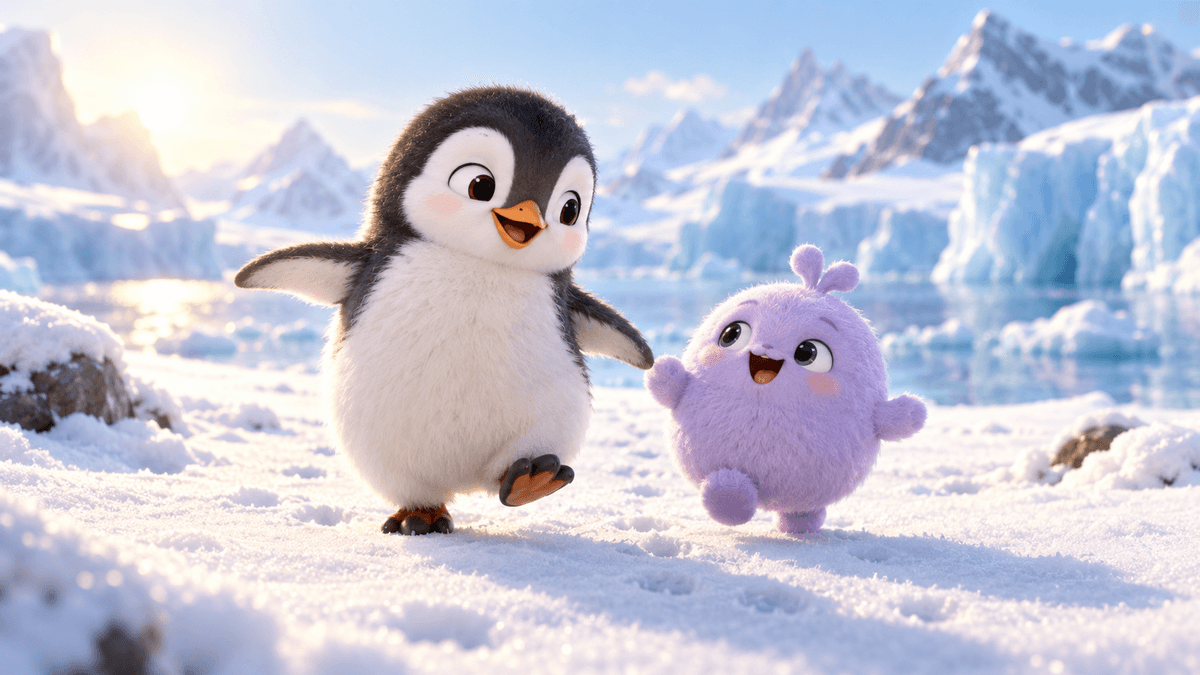
Upload one character or product photo and let the Gugu Gaga Penguin Video Generator animate it into a cute, 1080p 3D penguin interaction video. Powered by ByteDance Seedance 2.0 image-to-video, it adds QQ-bouncy body motion, adorable childlike voice, and cozy scene lighting in seconds — no shoot, no editing timeline, and no production crew required.

Creative controlsVideo
Model
Generation cost408 credits
PreviewSeedance 2
Examples · Gugu Gaga Penguin Video Generator

Your next creation starts here.

Choose a model and describe your idea. Your finished work will appear here.

Gugu Gaga Penguin Video Generator

Upload one character or product photo and let the Gugu Gaga Penguin Video Generator animate it into a cute, 1080p 3D penguin interaction video. Powered by ByteDance Seedance 2.0 image-to-video, it adds QQ-bouncy body motion, adorable childlike voice, and cozy scene lighting in seconds — no shoot, no editing timeline, and no production crew required.

  • Fast render
  • Audio-ready
  • Commercial-ready
0
Generated penguin interaction video

3 Steps to Your Penguin Interaction Video

Upload Your Character Photo

Drop in a single clear photo of your character, mascot, or product. The sharper and better-lit the image, the cleaner and more realistic your Gugu Gaga Penguin Video Generator result will be. PNG, JPG, and WebP are supported.
Pick a Story and Generate

Choose a preset story — Cozy Living Room, Tail Boop, or Grumpy Pull — and optionally add a line of direction for camera or lighting. The Gugu Gaga Penguin Video Generator uses ByteDance Seedance 2.0 image-to-video to animate your photo with QQ-bouncy motion and optional adorable voice while keeping your character faithful to the original.

Preview and Download

Your penguin interaction video renders in the result panel where you can play it on loop, then download a ready-to-publish MP4. Use it for TikTok, Reels, Shorts, brand social accounts, and IP short dramas — every Gugu Gaga Penguin Video Generator clip comes with commercial usage rights.

Gugu Gaga Penguin Video Generator

Turn One Still Photo into a Cute Penguin Interaction Video

The Gugu Gaga Penguin Video Generator converts a flat character image into motion that actually sells — QQ-bouncy body physics, a penguin that turns and reacts, and camera work that draws the eye. Instead of booking a videographer and a studio, you upload the photo you already have and get a polished clip in seconds, so every idea can have its own video without blowing up your budget.

Works for Any Character, Mascot, or Product Shot

Whether you run an original IP, a virtual idol account, or a brand mascot, the Gugu Gaga Penguin Video Generator adapts to your source image. It respects the original color, silhouette, and identity so the video stays true to what your audience already loves, keeping character consistency across episodes.

Add Adorable Voice and Sound in One Click

Toggle Generate Audio and the Gugu Gaga Penguin Video Generator adds a childlike "gugu gaga" voice, feather-rustle foley, and cozy ambient audio to your clip. No separate dubbing, no audio editing — every export is ready to post with sound that matches the contrast-mo comedy.

Loved by Creators, Brands, and IP Studios

Copy preserved from the original website

My penguin finally talks

I uploaded my IP reference and got a clip of my penguin saying "gugu gaga" in under a minute. The QQ-bouncy tail motion is exactly what I wanted. Followers loved it.

Looks like a real studio shoot

The cozy living room scene gave my penguin natural warm light and the voice actually sounds adorable. Viewers thought we hired a 3D production team.

Perfect for short-form social

I generate the vertical version for Reels and the wide one for YouTube from the same photo. The sound toggle saves me a whole dubbing step.

Kept my character consistent

I was worried the penguin would drift from my original design, but the video stayed true to the source. That consistency matters a lot for my IP series.

From photo to post in minutes

The grumpy-pull story is my favorite. It turns a still character sheet into something people stop scrolling for. Quick to test different scenes too.

No editing skills needed

I don't know how to use video software at all. I just pick a story, hit generate, and download. It removed the entire production barrier for my channel.

More Tools Like the Gugu Gaga Penguin Video Generator

Gugu Gaga Penguin Video Generator — Frequently Asked Questions

What is the Gugu Gaga Penguin Video Generator, and who is it for?

The Gugu Gaga Penguin Video Generator is an AI image-to-video tool that turns one character photo into a cute 1080p penguin interaction video with QQ-bouncy motion and optional adorable voice. It is built for IP creators, virtual idol accounts, brand teams, and anyone who wants a fast, scroll-stopping short clip without a production crew.

Which AI model powers the Gugu Gaga Penguin Video Generator, and what about quality and format?

It runs on ByteDance Seedance 2.0 image-to-video, a high-quality model that adds natural motion, camera movement, and optional audio to a still image. You can choose 4s, 8s, or 12s duration, 480p, 720p, or 1080p resolution, and 16:9, 9:16, or 1:1 output, so every clip fits the channel you publish on.

Can I customize beyond the preset stories? How does the Gugu Gaga Penguin Video Generator handle that?

Yes. Pick a preset story as a base, then add your own line of direction for camera, lighting, or motion in the Extra Direction field. You can adjust duration, resolution, aspect ratio, and audio independently, so the Gugu Gaga Penguin Video Generator adapts to your creative intent while keeping the penguin character intact.

Can I use the generated videos commercially, and how is copyright handled?

Yes. Videos created with the Gugu Gaga Penguin Video Generator come with commercial usage rights, so you can use them on paid ads, brand social accounts, IP short dramas, and monetized channels. You are responsible for the rights to the source photo you upload.

How does pricing and usage limit work for the Gugu Gaga Penguin Video Generator?

Each generation uses credits based on duration and resolution, shown in the cost panel before you click Generate. Credits never expire on ImagineGo and work across every model in the platform, so you only pay for what you actually render.

Will the video jitter or tear, and how does the Gugu Gaga Penguin Video Generator protect detail?

Seedance 2.0 is tuned for stable motion and identity consistency across multi-shot scenes. For the cleanest result, upload a sharp, well-lit source image — very fine prints or tiny logos can shift slightly, so higher resolution gives the most accurate penguin interaction video.

My computer is average — can the Gugu Gaga Penguin Video Generator run smoothly?

Yes. All rendering happens in the cloud on ImagineGo's servers, so the Gugu Gaga Penguin Video Generator works in any modern browser on a laptop, tablet, or phone. You only need a stable internet connection to upload, generate, and download.

How is the Gugu Gaga Penguin Video Generator different from traditional editing or motion software?

Traditional tools need a timeline, keyframes, and dubbing. The Gugu Gaga Penguin Video Generator turns one still photo into a finished, audio-ready clip in seconds — no editing skills, no crew, and no software to install. You can iterate on stories and scenes rapidly, which is ideal for social-first content.

Are there content restrictions I should know about when using the Gugu Gaga Penguin Video Generator?

Yes. The Gugu Gaga Penguin Video Generator follows ImagineGo's acceptable use policy and does not allow violent, sexual, deceptive, or rights-infringing content. Prompts involving policy-sensitive material may render more slowly or fail, and failed generations are automatically refunded.