
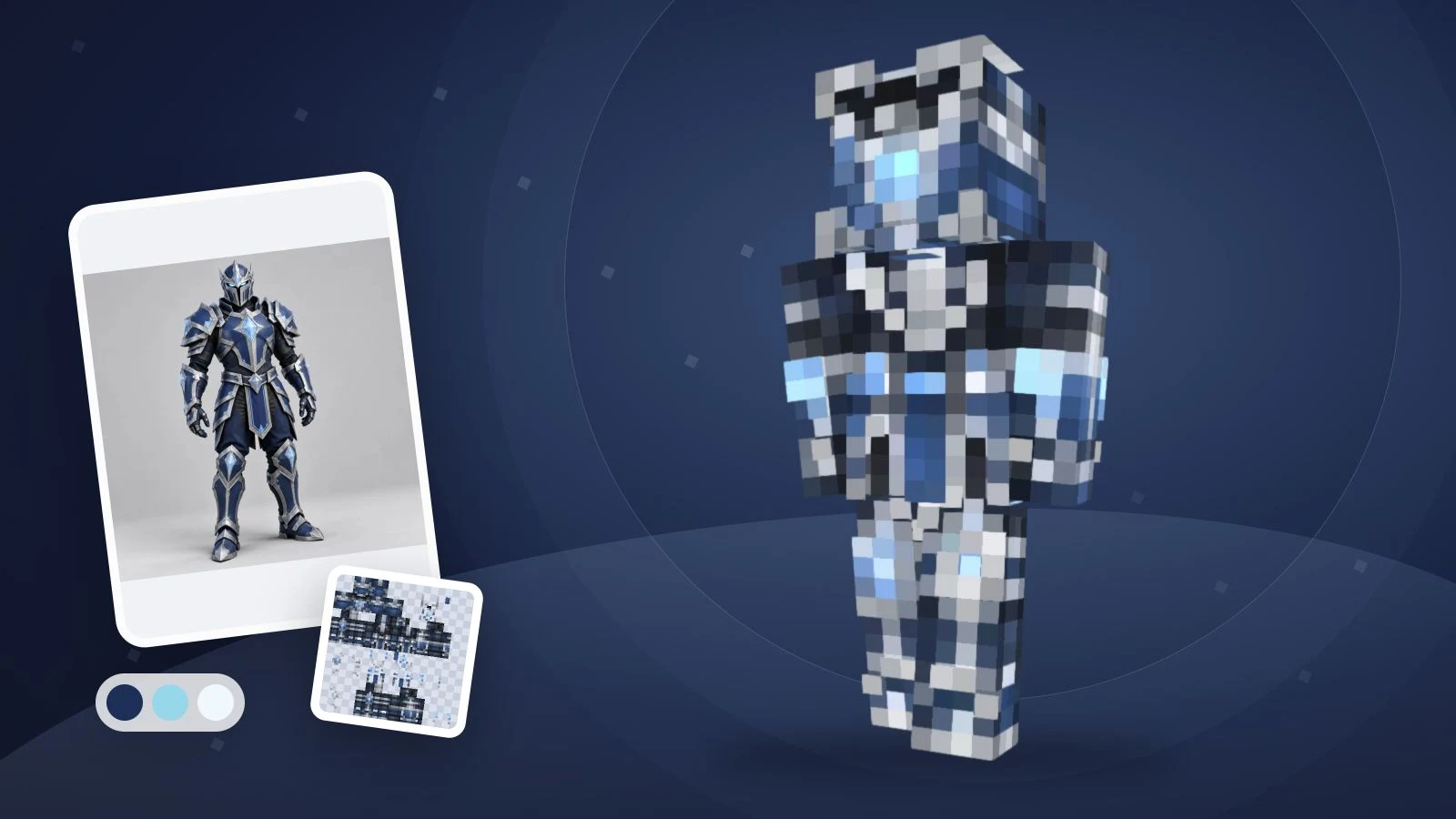
用 AI 创作 Minecraft 皮肤,可以先描述一个角色的外观,再生成皮肤、在 3D 中检查并下载 PNG。 从角色身份、少量配色、从头到脚的服装和背面细节开始,ImagineGo 的文字生成皮肤模式支持这一流程。
如果你搜索的是“skin minecraft prompt with ai”,下面的英文提示词可以帮助你把想法写成可用的角色描述。这些是原创起点,不是经过逐条生成验证的效果保证;文字模式不需要照片。角色插画并不等于游戏皮肤,导入 Minecraft 需要映射到模型上的展开 PNG。当前输出为 64×64 Classic/Steve 皮肤,可预览并编辑。
可复用的 Minecraft 皮肤提示词模板
描述外观,不要把任务写成电影海报。下面保留英文模板,方便直接用于生成,并把头发、衣服、鞋子和背面分别指定。
A [role or original character] with [hair and visible face details],
wearing a [main color] [top], [color] [trousers] and [color] [shoes].
Add [one simple accent]. Keep the back [specific color or pattern].
Use clear Minecraft pixel details and keep the face visible.
这不是特殊指令语法,模型负责贴图布局,提示词负责外观。当前文字模型的左右肢体镜像,需要不同袖子或裤腿时请在编辑器中修改。控制在 500 字符以内。
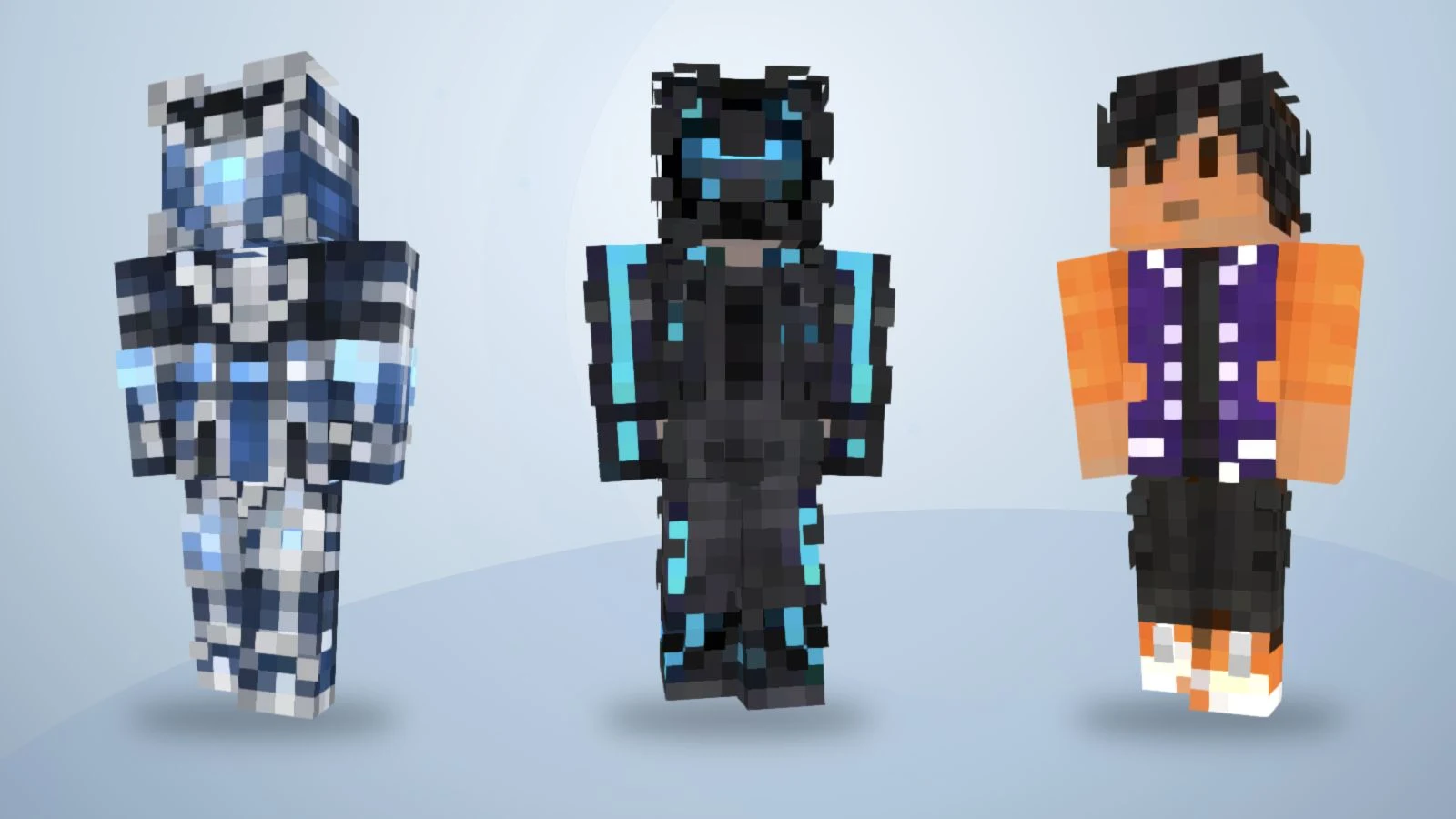
图中为已有示例贴图的重新渲染,用于展示配色和服装差异,不是下方十二条提示词的生成结果。
“很酷的探险家”留下了太多空白;明确写出绿色夹克、米色衬衫、棕色裤子和深色靴子,更容易检查结果。
- 指定主要颜色。 分别描述上衣、裤子和鞋子。
- 保留一个辨识点。 选围巾、袖口或胸前色块,不要堆砌微小配件。
- 说明背面。 写清背面延续配色,还是保持简单。
这些是设计建议,AI 仍可能简化或漏掉细节。
12 个可以自行修改的皮肤提示词
以下保留可直接复制的英文 prompt,每条都描述原创角色。你可以更换发色、服装和点缀。徽章、头盔或围巾只代表贴图外观,不会增加游戏装备、光效或能力。
1. 森林制图师
A forest cartographer with short chestnut hair and a visible face,
wearing a moss-green jacket, cream shirt, brown trousers and dark
boots. Add one tan chest patch. Keep the jacket back plain green.
Use clear Minecraft pixel details without lettering.
先改夹克和胸前色块。大面积简单配色便于检查。
2. 冰霜远征骑士
An original frost expedition knight with dark hair and a visible
face, wearing slate-blue armor over a navy outfit, pale-blue cuffs
and charcoal boots. Add a simple white diamond emblem on the chest.
Continue the blue armor across the back. No weapons or lettering.
把胸前徽记当作几何点缀,检查缩小后是否仍能辨认。
3. 霓虹城市信使
A city courier with short black hair, wearing a charcoal jacket
with cyan sleeve stripes, dark-purple trousers and white shoes.
Keep the face visible and the jacket back charcoal with one cyan
stripe. Use simple pixel shapes, no words and no extra equipment.
让亮色袖口与深色衣服形成对比,不要期待实际发光。
4. 沙漠遗迹探险家
An original character with a short lavender bob, a pale-blue hoodie,
cream trousers and lavender shoes. Add a simple white cloud patch
on the chest. Keep the back pale blue and the face unobstructed.
Use a small, consistent pastel palette with distinct clothing edges.
围巾和腰带应保持简洁,避免占满脸部和身体。
5. 樱花休闲角色
A desert mechanic with short brown hair, wearing a sand-colored
jacket over an orange shirt, dark-brown trousers and black boots.
Add dark cuffs and a small square chest pocket. Keep the back of
the jacket plain sand. No tools in the hands and no small text.
浅色服装需要清楚的边界,检查袖口和鞋子是否混在一起。
6. 红石工坊技师
An orchard gardener with curly dark hair, wearing a mustard shirt,
green overalls and brown boots. Add one red square patch on the
front pocket. Continue the overall straps and green fabric on the
back. Keep the face visible and the outfit readable as pixel art.
护目镜和工具细节只是画在皮肤上的图案,不会生成独立物品。
7. 星际研究员
A lunar station technician with silver hair and a visible face,
wearing a white utility suit with navy panels, orange cuffs and
navy boots. Add one orange chest badge. Keep the back white with
a navy center panel. No helmet, floating objects or lettering.
保持胸前标记简单,避免细小文字。
8. 苔藓遗迹守卫
A midnight scout with dark-purple hair, a black jacket, charcoal
trousers and black boots. Add a burgundy scarf pattern around the
neck and burgundy cuffs. Keep the face visible and continue the
plain jacket across the back. Separate black and charcoal clearly.
先检查主要绿色和石色区域,再决定是否手动补充纹理。
9. 铜色机械旅人
An original clockwork traveler with a copper-colored face and
two teal eyes, wearing a dark-brown coat, cream shirt, charcoal
trousers and copper boots. Add simple copper shoulder panels.
Keep the back of the coat brown. No exposed gears or tiny symbols.
用铜色和分区表现机械感,不必要求真实齿轮。
10. 秋日学院法师
An autumn academy mage with short auburn hair, wearing a burnt-orange
coat over a cream shirt, dark-brown trousers and tan boots. Add
maroon cuffs and a simple square chest emblem. Keep the coat back
orange and the face visible. No hat, staff, lettering or particles.
魔法主题是外观设定,导出的皮肤不会增加法杖或粒子。
11. 海洋研究潜水员
An ocean researcher with short black hair, wearing a teal diving
outfit with navy side panels, yellow cuffs and navy boots. Leave
the face visible. Add a simple yellow square on the chest and keep
the back teal with navy panels. No fins or separate breathing gear.
把装备感表达为服装上的色块,不要期待额外三维几何。
12. 紫色棒球夹克角色
An original varsity character with short black hair, wearing a
violet jacket with orange sleeves, white trim, black trousers and
orange-and-white shoes. Keep the jacket back plain violet. Keep
the face visible and use clean pixel details without letters.
这是建议描述,并不是 ImagineGo 现有公开棒球夹克案例的实际生成词。
如何在 ImagineGo 把描述生成皮肤
打开 AI Minecraft 皮肤生成器并选择文字生成皮肤。本文按 2026 年 11 月 13 日的界面与流程编写。
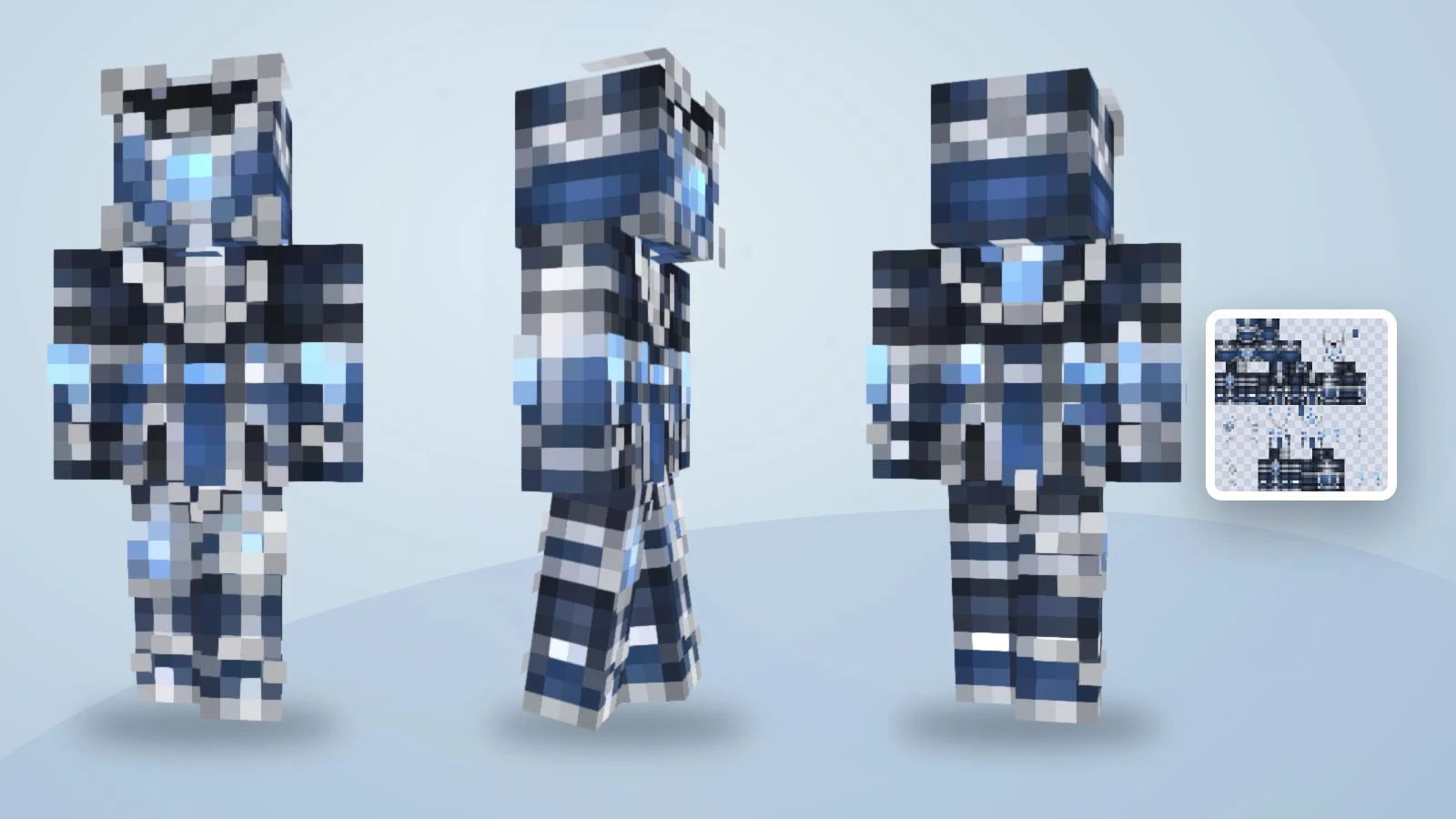
同一现有示例的三个观察角度,用于说明检查方法,并非森林制图师提示词的结果。
1. 选择文字模式并输入描述
将一条英文提示词粘贴到角色描述框,登录后生成,无需上传图片。如果希望从自己的外观开始,请选择照片模式,并确保有权使用参考图。
2. 生成并在 3D 中检查
点击生成按钮。文字模式直接创建游戏皮肤,无需另外购买预览或转换,当前每次为 5 积分。检查脸部、背面、袖子和鞋子。输出为从旧版 64×32 布局适配的 64×64 Classic/Steve PNG,左右肢体镜像,不能通过不同袖子的描述获得独立左右贴图。
3. 修改细节并下载 PNG
小范围颜色或像素错误可以在免费皮肤编辑器里修正,手动编辑和导出不需要再次 AI 生成。改变整体设计并重新提交则会单独消耗积分。下载贴图文件,不要保存 3D 截图;原始文件导入时选择 Classic/Wide。改为 Slim 后应检查手臂边缘,并在游戏中选择匹配的模型。基岩版还需检查设备是否支持自定义导入。
先旋转示例,再创作自己的角色
拖动已有蓝色骑士,检查贴图如何包裹身体。使用正面、背面和行走控件查看不同位置。这是现有示例,并非十二条建议提示词中新生成的结果。

正在载入示例皮肤……
修改描述,还是直接编辑像素?
整体角色不对时修改提示词;概念正确、只差一个小细节时使用编辑器。
| 观察到的问题 | 下一步 | 示例 |
|---|---|---|
| 服装缺少明确特征 | 指定衣物和颜色 | 把“酷探险家”改成“绿夹克、米色衬衫、棕裤子” |
| 背面不符合想法 | 明确描述背面 | 背面保持纯藏蓝,不加符号 |
| 小细节太多 | 只保留一个点缀 | 保留围巾,去掉文字和小徽章 |
| 袖口或鞋子像素不对 | 在编辑器修正局部 | 重新涂袖口,无需再次生成 |
| 得到角色图而非皮肤 | 检查流程与下载文件 | 文字模式下载最终 PNG;照片模式另有转换步骤 |
常见问题
怎样的提示词更实用?
描述一个角色,明确主要衣物颜色,从头写到鞋子,并补充重要的背面细节。考虑贴图有限的像素,检查实际结果,不要假设模型一定完整执行。
没有照片能生成吗?
可以。文字生成皮肤从角色描述开始;照片模式适合拥有或获授权使用参考图的人。
需要要求 4K 皮肤吗?
这条流程的最终文件为 64×64。放大概念图不能替代正确贴图布局,放大 PNG 也不能修复映射。
需要在提示词里写展开图布局吗?
不需要。描述角色外观即可,工具负责皮肤布局,使用前检查导出文件及其 3D 映射。
还没选好工具怎么办?
先比较各工具的输入、预览、编辑和导出流程。如果设计已确定,可以直接文字生成并检查最终皮肤。
开始制作你的 Minecraft 皮肤
描述角色、检查预览,再制作可以查看和编辑的游戏皮肤。