Grok Imagine 1.5 Preview Review: Is xAI's Image-to-Video Model Worth Trying?
ImagineGo Team
6/2/2026
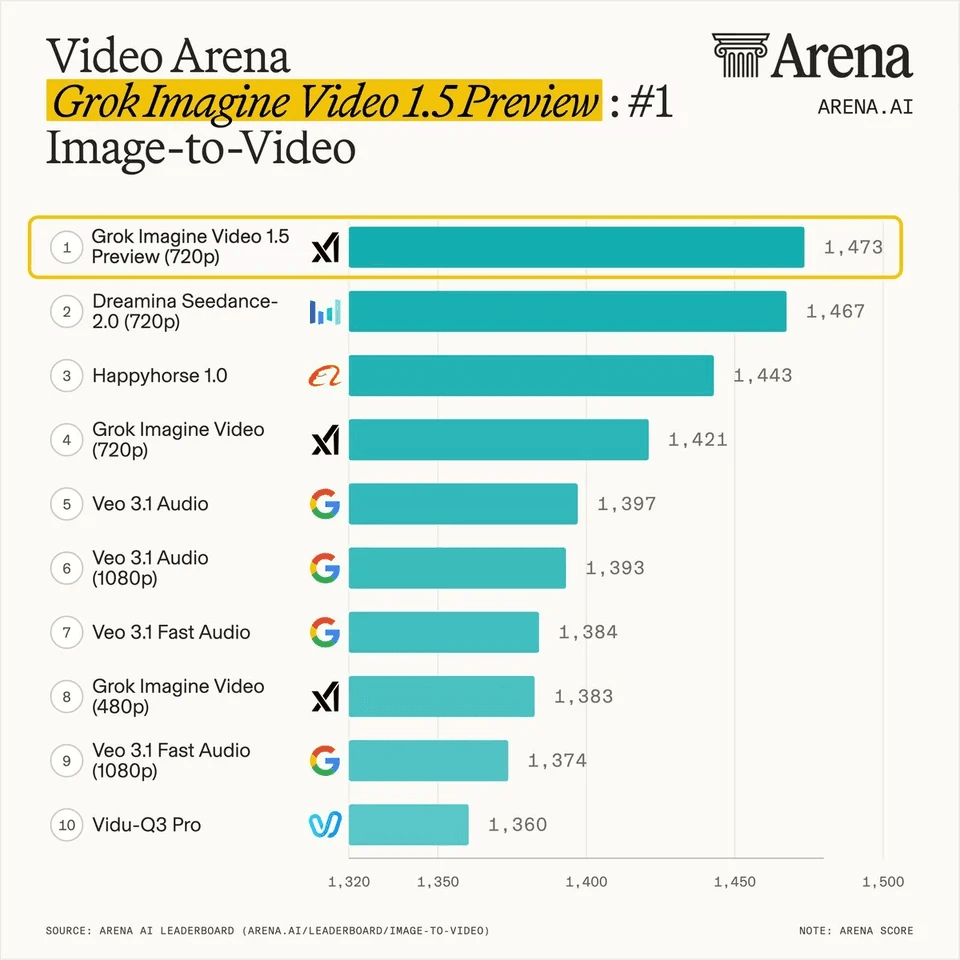
Grok Imagine 1.5 Preview is worth testing if you want short image-to-video clips with strong subject stability, realistic motion, and simple controls. It is not a long-form video tool, and the "Preview" label matters, but the early signal is strong: xAI lists the model as grok-imagine-video-1.5-preview, third-party API pages support the same image-to-video workflow, and recent Arena coverage has placed Grok Imagine Video 1.5 Preview near the top of image-to-video rankings.
For creators, the practical question is not whether the model has a viral leaderboard screenshot. The question is whether it can turn a strong still image into a usable clip without melting the subject, overcomplicating the workflow, or making every iteration too expensive. This review breaks that down with verified specs, use-case guidance, and a clear recommendation.
What is Grok Imagine 1.5 Preview?
Grok Imagine 1.5 Preview is xAI's newer image-to-video model for turning a source image into a short video. The official xAI model page lists the model name as grok-imagine-video-1.5-preview, with an alias of grok-imagine-video-1.5-2026-05-30. xAI's Imagine overview also describes the broader Imagine API as a system for generating and editing images and videos, including video generation from still images.
On ImagineGo, the model is available as Try Grok Imagine 1.5. The current ImagineGo model configuration supports:
| Feature | Current ImagineGo support |
|---|---|
| Primary workflow | Image-to-video |
| Required input | At least one image |
| Durations | 5, 10, or 15 seconds |
| Resolutions | 480p or 720p |
| Aspect ratios | auto, 1:1, 16:9, 9:16, 4:3, 3:4, 3:2, 2:3 |
| Best fit | Short cinematic clips, social video, product motion, character moments, storyboard tests |
That setup tells you a lot about the model's real purpose. It is designed for compact motion clips anchored by a reference image, not for generating a full scene sequence from scratch.
What the Arena ranking means
The ranking image circulating for Grok Imagine Video 1.5 Preview shows it at the top of an Arena image-to-video leaderboard, above several other video models. That is a useful signal. It suggests human raters are responding well to the model's outputs in head-to-head comparisons.
But a leaderboard should be treated as evidence, not as a complete buying decision.
Benchmarks are strongest when they answer a narrow question: "How did this model perform under this evaluation setup?" They are weaker when users treat them as a guarantee for every prompt, every style, and every production workflow. A model can rank well and still be the wrong choice for your use case if you need longer clips, more editing control, lower iteration cost, or a specific visual style.
For Grok Imagine 1.5 Preview, the Arena result is best read this way:
- The model is highly competitive for image-to-video quality.
- It appears especially strong for short clips where the reference image remains the visual anchor.
- It still needs practical testing against your own prompts, source images, and publishing needs.
That is why this review focuses on workflow fit rather than hype.
Hands-on review criteria
When evaluating an image-to-video model, the right question is not simply "Does it look good?" A good clip can fail if it loses the subject, ignores the prompt, or creates motion that looks impressive for two seconds and then breaks.
Use these five criteria when testing Grok Imagine 1.5 Preview.
1. Subject consistency
This is the model's most important job. If you upload a person, character, mascot, product, or branded asset, the generated clip should keep the core identity intact.
Look for:
- stable face shape and silhouette
- consistent outfit or product details
- no sudden identity drift
- no strange hand, eye, or logo changes that distract from the shot
Grok Imagine 1.5 Preview is strongest when the source image is clean, high contrast, and easy to understand. If your input image is cluttered, heavily cropped, or visually ambiguous, the model has less reliable information to preserve.
2. Motion realism
The best image-to-video clips do not need constant action. Small believable motion is often more useful than dramatic movement.
Good outputs usually include:
- subtle camera drift
- natural lighting change
- realistic hair, fabric, smoke, rain, or reflection movement
- motion that fits the subject's body and scene
Overly aggressive prompts can create strange physics. If the image is a close-up portrait, ask for a cinematic close-up, soft head movement, wind, and lighting shift. Do not ask the same image to become a complex action scene unless the visual source can support it.
Where Grok Imagine 1.5 Preview performs best
Grok Imagine 1.5 Preview is most useful when you already have a strong still image and want to give it motion. That makes it different from a blank-canvas text-to-video workflow. The image does much of the identity work, while the prompt controls movement, camera behavior, and mood.
Product and brand clips
If you have a product image, campaign visual, mascot, or hero graphic, Grok Imagine 1.5 Preview can help you create short motion variants without planning a full shoot. This is useful for landing pages, paid social concepts, ecommerce teasers, launch posts, and creative testing.
Use prompts that describe the camera and material behavior:
``text Turn this product image into a polished cinematic reveal. Slow camera push-in, soft studio lighting, subtle reflections, realistic shadows, premium commercial style. ``
Character and creator content
For character art, creator portraits, music visuals, or influencer-style clips, the model works best when the prompt protects identity. Mention what should stay consistent, then describe the motion.
``text Keep the character's face, outfit, color palette, and hairstyle consistent. Add a slow dramatic camera drift, subtle breathing motion, soft wind, and cinematic lighting. ``
Social video concepts
Short-form platforms reward fast visual hooks. A 5 or 10 second clip can be enough for a teaser, loop, announcement, or visual intro. In this case, the model's short duration is not a weakness. It matches the format.
Specs, limits, and pricing to know
The model's limits are important because they shape how you should plan a project.
Official xAI documentation lists grok-imagine-video-1.5-preview as an image and video model. The model page lists API output pricing at $0.08 per second, with regional details showing 480p at $0.08 per second and 720p at $0.14 per second. It also lists a $0.01 image input price. xAI says users are charged for each second of video generated through the API.
Inside ImagineGo, the user-facing setup is simpler: choose the model, upload an image, set the duration and resolution, then generate. The current ImagineGo model page supports 5, 10, and 15 second clips at 480p or 720p.
Here is the practical reading:
| Decision | Recommendation |
|---|---|
| First test | Start with 5 seconds at 480p |
| Best review pass | Use 10 seconds to judge motion and consistency |
| More polished result | Use 720p when the clip is close to final |
| Social teaser | 5 or 10 seconds is usually enough |
| Storyboard or mood test | 10 or 15 seconds gives the scene more room |
| Long-form sequence | Use multiple clips or compare other video models |
If you want to compare the model against other options, use Explore AI Video Models or start from Create AI Video.
What the model is not good for
Grok Imagine 1.5 Preview is strong, but it is not the right answer for every video job.
It is not ideal if you need:
- long continuous scenes from one generation
- exact frame-by-frame control
- complex multi-character blocking
- heavy dialogue or lip-sync workflows
- precise product compliance shots
- guaranteed repeatability across many clips
The model can help with concepting and short creative assets. For production-critical work, you still need review, iteration, and sometimes manual editing after generation.
This is especially true for branded visuals. A product reveal that looks good at a glance may still need close review for label text, logo geometry, packaging shape, and small material details.
Prompting tips for better results
Good Grok Imagine 1.5 Preview prompts are specific, but not overloaded. The image provides the visual base. The prompt should explain movement and constraints.
Use this structure:
1. Say what must remain consistent. 2. Describe the main motion. 3. Add camera direction. 4. Add lighting and mood. 5. Keep the scene physically plausible.
Example:
``text Keep the subject's face, outfit, and color palette consistent. Create a slow cinematic close-up with subtle head movement, soft wind in the hair, gentle camera push-in, warm sunset lighting, realistic motion, and a calm editorial mood. ``
Avoid prompts that ask for too many scene changes at once. If the uploaded image is a studio portrait, do not ask it to become a crowded street chase, a drone shot, and an explosion sequence in the same clip. The model will usually perform better when the prompt extends the image instead of fighting it.
How it compares with other AI video models
Grok Imagine 1.5 Preview should be compared by use case, not brand name. It is best positioned as a strong image-to-video model for short clips.
| Model type | Better when you need | Tradeoff |
|---|---|---|
| Grok Imagine 1.5 Preview | Realistic motion from a strong reference image | Short duration and preview-stage behavior |
| Seedance-style models | Fast creative video exploration and broad motion styles | Output character stability varies by prompt and image |
| Veo-style models | High-end cinematic generation and audio-capable workflows | May cost more or require more workflow planning |
| Sora-style models | Stylized storytelling and cinematic ideation | Availability and workflow details can vary by platform |
If your workflow depends on comparing outputs, a multi-model setup is more useful than reading one model review in isolation. ImagineGo is built for that: you can test Grok Imagine 1.5 Preview, compare other video models, and use the result that fits the specific asset.
Should you use Grok Imagine 1.5 Preview?
Use Grok Imagine 1.5 Preview if your goal is to animate an existing image into a short, realistic, visually stable clip. It is especially promising for product teasers, character moments, creator visuals, landing page motion, music artwork, storyboard tests, and short social video.
Skip it, or compare other models first, if you need long-form video, precise editing control, or complex multi-shot continuity.
My practical recommendation is simple:
- Use 480p and 5 seconds for quick tests.
- Move to 10 or 15 seconds when the prompt direction is working.
- Use 720p for outputs you plan to review, present, or publish.
- Compare at least one other model before committing to a campaign workflow.
For most creators, the best next step is to run one controlled test with a clean source image and a clear motion prompt. You can do that here: Try Grok Imagine 1.5.
Sources and verification notes
This review uses official and implementation-facing sources where possible:
- xAI's official model page for
grok-imagine-video-1.5-previewconfirms the model name, alias, regions, rate-limit overview, and API pricing. - xAI's Imagine overview confirms that Grok Imagine supports image and video generation workflows, including image-to-video.
- fal's Grok Imagine Video 1.5 image-to-video API page confirms the image-to-video implementation pattern and input fields.
- ImagineGo's local model configuration confirms the current site experience: image-to-video input, 5/10/15 second durations, 480p/720p resolution options, and supported aspect ratios.
- The Arena leaderboard signal is treated as a ranking signal, not as proof that the model is best for every workflow.
FAQ
What is Grok Imagine 1.5 Preview?
Grok Imagine 1.5 Preview is an xAI image-to-video model listed officially as grok-imagine-video-1.5-preview. It turns a source image into a short video using a text prompt to guide motion, camera behavior, mood, and style.
Is Grok Imagine 1.5 Preview image-to-video or text-to-video?
On ImagineGo, Grok Imagine 1.5 Preview is offered as an image-to-video model. You upload an image first, then describe how that image should move.
How long can Grok Imagine 1.5 Preview videos be?
ImagineGo currently supports 5, 10, and 15 second outputs for Grok Imagine 1.5 Preview. For broader context on Grok video duration, read Grok Video Length.
What resolution does Grok Imagine 1.5 Preview support?
ImagineGo currently supports 480p and 720p for this model. Use 480p for cheaper drafts and 720p when you want a sharper clip for review or publishing.
Is Grok Imagine 1.5 Preview better than other AI video models?
It is competitive, especially for image-to-video clips that need realistic motion and stable subjects. But "better" depends on your project. Compare it with other models if you need longer clips, different aesthetics, audio workflows, or more editing control.
Where can I try Grok Imagine 1.5 Preview?
You can try it on ImagineGo here: Try Grok Imagine 1.5. You can also compare it with other models through Explore AI Video Models.