Grok Imagine Video 1.5 Preview
No video yet
Add a prompt to generate your first video.
Grok Imagine Video 1.5 Preview overview
Turn a required image into realistic video. Describe the motion, choose 5, 10, or 15 seconds, and create stable image-to-video clips.
Build brand, product, and character content faster
For brands and small teams, video production often slows down because every variation requires new planning. This model helps you create motion options from the assets you already have. Turn a campaign image into several ad directions, animate a mascot for seasonal posts, create product reveal clips for a launch, or test how a visual identity feels across different scenes. You can keep the same subject while changing the location, camera angle, lighting, or emotional tone. That flexibility makes Grok Imagine Video 1.5 Preview helpful for ecommerce, creator merchandising, game promos, event announcements, personal branding, and content calendars that need fresh motion without starting from scratch each time.
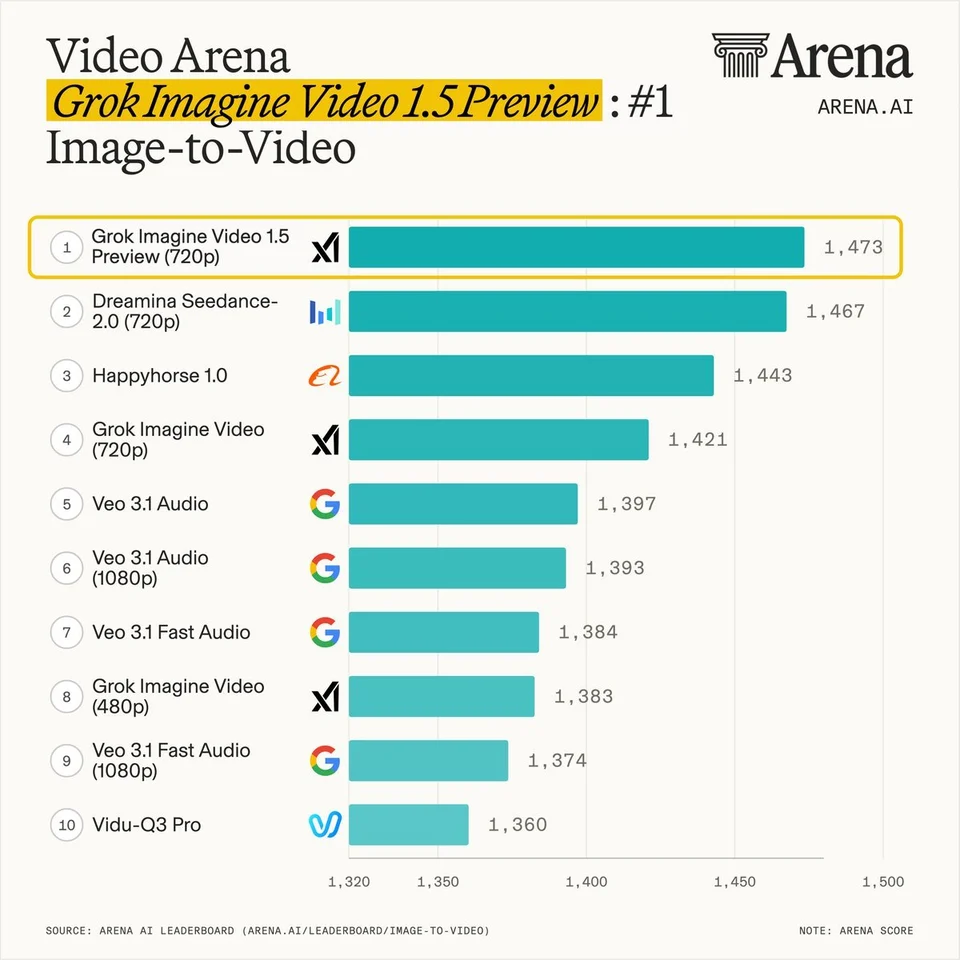
Turn reference images into cinematic clips
Use Grok Imagine Video 1.5 Preview when you already have a strong image and want to give it cinematic life. A fashion portrait can become a dramatic close-up with subtle head movement and changing light. A fantasy character illustration can become a short hero shot with atmosphere, camera drift, and environmental motion. A product image can become a smooth reveal with reflections, shadows, and a sense of scale. The model works well for creators who want the original image to remain the anchor while the scene gains movement, emotion, and timing. This is helpful for portfolio posts, landing page visuals, ad concepts, music covers, game characters, and any creative asset that needs more presence than a static image can provide.
Create social videos with stronger visual impact
Short-form platforms reward motion that catches attention quickly. With this model, you can create compact clips for TikTok, Instagram Reels, YouTube Shorts, X, Pinterest, and paid social placements without arranging a shoot for every idea. Describe the hook, the subject, the setting, and the camera energy: a creator stepping into neon light, a sneaker rotating through a rainy city reflection, a character turning toward the lens, or a food scene coming alive with steam and hand movement. Because the output is concise, it fits naturally into teasers, loops, announcement posts, before-and-after edits, and fast creative testing. It is a strong way to add motion to campaigns that would otherwise rely only on still images.
Prototype storyboards and film-style moments
Grok Imagine Video 1.5 Preview is useful when you want to test a scene before producing it for real. You can sketch different genres, shot types, and moods in minutes: documentary tension in a crowd, a sports-drama sprint, a spy-film ballroom moment, a quiet love scene, a horror hallway, or an adventure shot above the city. The goal is not only to make a pretty clip, but to help you decide whether a concept works when it moves. Directors, writers, marketers, musicians, and solo creators can use these clips as visual references, pitch materials, mood tests, or quick drafts that communicate timing and emotion more clearly than a written note.
Why creators choose Grok Imagine Video 1.5 Preview
Realistic image-to-video motion
Grok Imagine Video 1.5 Preview is strongest when you begin with a reference image and want it to move with convincing physical detail. A portrait can turn into a close-up with wind in the hair, a product photo can become a polished reveal, and a character concept can become a short scene with posture, expression, and lighting that feel connected. The model is built to reduce the common problems that make AI video feel artificial, such as drifting faces, rubbery movement, or a subject that slowly changes identity during the clip.
Better prompt following
Detailed prompts matter, and this model is built to listen closely. You can describe camera direction, location, wardrobe, action, mood, pacing, and visual style in normal language. That makes it easier to create a clip that matches the idea in your head: a rainy street chase, a quiet romantic close-up, a dramatic stadium entrance, a moody horror hallway, or a bright fireworks scene. The more clearly you describe the action, the easier it becomes to guide the final result without learning complicated controls.
Consistent characters and scenes
For creators working with people, mascots, products, or branded visuals, consistency is everything. Grok Imagine Video 1.5 Preview helps preserve the important visual cues from your reference image, including face shape, silhouette, color palette, outfit direction, and overall scene identity. That makes it a practical choice for character-led clips, influencer-style visuals, brand storytelling, and short narrative beats where the viewer needs to understand that the same subject is still on screen.
Fast clips for creative decisions
Flexible 5, 10, and 15 second durations make it easy to match the clip to your idea. Use 5 seconds for quick hooks, 10 seconds for fuller product or character moments, and 15 seconds when a scene needs more room to breathe. You can explore multiple versions of a shot before committing to a larger campaign, compare different moods, test framing for a social video, or create several motion directions for a client presentation.
Flexible Credit Packages
Choose the perfect credit package for your needs. Credits never expire.
 Grok Imagine Video10 credits200 videosGrok Imagine Video 1.5 Preview75 credits26 videos
 Seedance 1.5 Pro7 credits285 videos
 Veo 3.1 Lite10 credits200 videosVeo 3.1 Fast20 credits100 videosVeo 3.1 Quality150 credits13 videos
 Wan 2.560 credits33 videosWan 2.780 credits25 videos
 Hailuo 2.3 Pro40 credits50 videos
 Kling 2.655 credits36 videosKling 2.6 Motion Control48 credits41 videosSeedance 2 Fast62 credits32 videosSeedance 276 credits26 videosKling 3.070 credits28 videosz-image0 creditsInfinity imagesNano Banana3 credits666 imagesNano Banana Pro6 credits333 imagesNano Banana 25 credits400 imagesSeedream 4.56 credits333 imagesSeedream 5 Lite6 credits333 imagesGrok Imagine4 credits500 images
 Flux 2 Pro5 credits400 images
 GPT Image 1.54 credits500 imagesGPT Image 23 credits666 imagesWan 2.7 Image5 credits400 imagesWan 2.7 Image Pro12 credits166 images
✨ More models continuously updating...
Lifetime Validity
Your credits never expire. Purchase now and use them next week, next month, or next year.
FAQ
What is Grok Imagine Video 1.5 Preview best for?+
It is best for turning a required reference image into a realistic short video. Creators use it for cinematic clips, social posts, product teasers, character moments, campaign drafts, music visuals, and storyboard tests.
Is an image required?+
Yes. Grok Imagine Video 1.5 Preview is an image-to-video model, so you must upload at least one image before generating. The prompt then tells the model how that image should move.
How long are Grok Imagine Video 1.5 Preview outputs?+
You can choose 5, 10, or 15 second clips. Use 5 seconds for quick hooks and fast drafts, 10 seconds for fuller product or character moments, and 15 seconds when a scene needs more pacing and atmosphere.
Which resolutions can I choose?+
You can choose 480p or 720p. Use 480p when you want faster, more affordable drafts, and choose 720p when you want a sharper result for presentation, publishing, or closer review.
Which aspect ratios are supported?+
Supported aspect ratios are auto, 1:1, 16:9, 9:16, 4:3, 3:4, 3:2, and 2:3. Choose auto when you want the video to follow the uploaded image size.
How should I write a good prompt for this model?+
Describe the subject, action, location, camera movement, lighting, mood, and style in plain language. For example, mention whether the shot should feel cinematic, documentary, romantic, dramatic, playful, or realistic, and include the key motion you want to see.
Will the subject stay consistent throughout the video?+
Grok Imagine Video 1.5 Preview is designed to keep the main subject more stable than many basic video generators, especially when you provide a clear reference image. For best results, use a clean image and describe which visual details should remain consistent.