
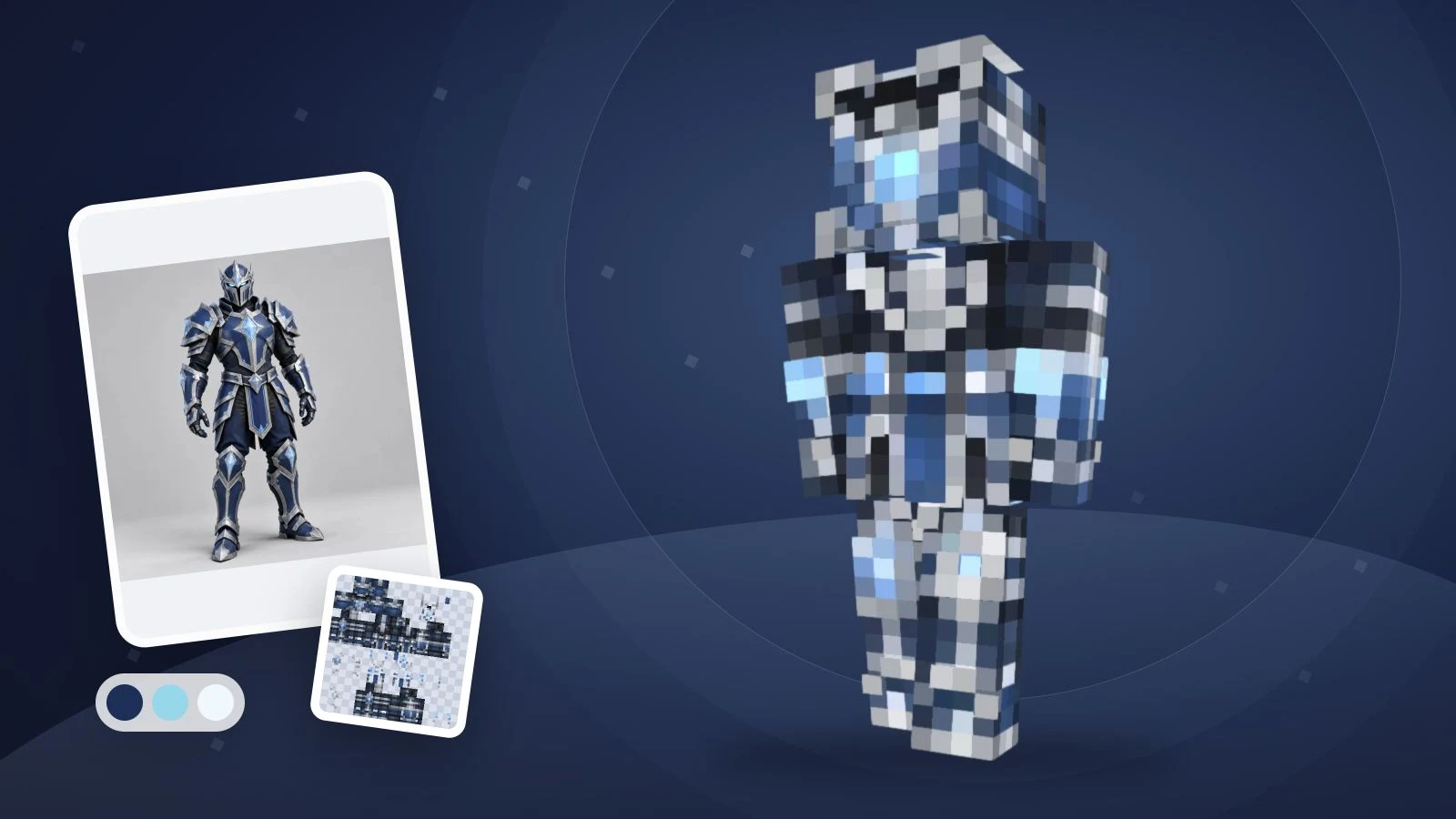
AI로 Minecraft 스킨을 만들려면 캐릭터 한 명의 외모를 설명하고, 생성 후 3D로 확인한 다음 PNG를 다운로드하세요. 역할, 간단한 색 조합, 머리부터 신발까지의 의상과 등 쪽 특징으로 시작합니다. ImagineGo의 텍스트 생성 모드가 이 과정을 지원합니다.
“skin minecraft prompt with ai”를 찾았다면 아래 영어 예시는 아이디어를 실제 입력으로 바꾸는 출발점입니다. 모두 독창적인 제안이며 각각의 출력 결과를 검증하거나 보장한 것은 아닙니다. 사진은 필요 없습니다. 캐릭터 그림과 게임 스킨은 다릅니다. Minecraft는 모델에 맞는 펼친 PNG 텍스처를 가져오며 현재 결과는 64×64 Classic/Steve PNG입니다.
반복해서 쓸 수 있는 프롬프트 공식
영화 포스터보다 캐릭터 외모를 설명하세요. 바로 사용할 수 있도록 템플릿은 영어로 제공합니다.
A [role or original character] with [hair and visible face details],
wearing a [main color] [top], [color] [trousers] and [color] [shoes].
Add [one simple accent]. Keep the back [specific color or pattern].
Use clear Minecraft pixel details and keep the face visible.
특별한 명령어 문법이 아닙니다. 도구가 텍스처 레이아웃을 처리하고 프롬프트는 외모를 지정합니다. 좌우 팔다리가 대칭이므로 다른 소매나 다리 무늬는 편집기에서 추가하세요. 500자 제한을 지켜야 합니다.
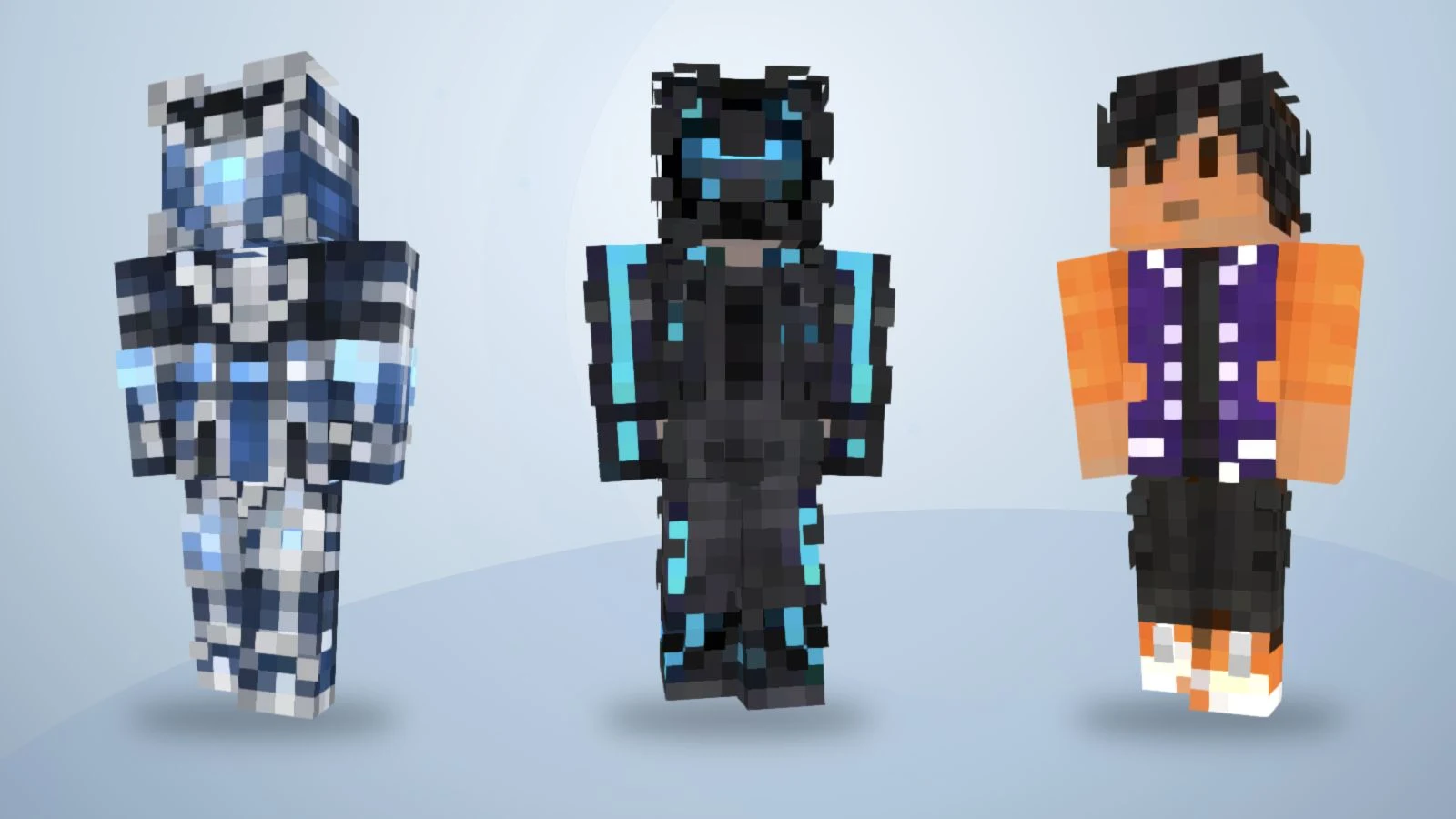
기존 텍스처를 3D로 다시 렌더링한 이미지입니다. 아래 12개 프롬프트로 생성한 결과가 아닙니다.
“멋진 탐험가”만으로는 많은 의상 선택이 비어 있습니다. 초록 재킷, 크림색 셔츠, 갈색 바지, 짙은 부츠처럼 쓰면 확인할 기준이 생깁니다.
- 주요 색을 지정하세요. 상의, 바지와 신발을 구분합니다.
- 특징 하나를 정하세요. 목도리, 소매 끝이나 가슴 패치에 집중합니다.
- 뒷면도 설명하세요. 앞의 색을 이어갈지 단순하게 둘지 정합니다.
AI가 세부 사항을 줄이거나 빼먹을 수 있으니 실제 결과를 살펴보세요.
수정해서 쓰는 Minecraft 스킨 프롬프트 12개
각 영어 프롬프트는 독창적인 캐릭터를 설명합니다. 머리색, 의상과 강조 부분을 바꿔 보세요. 배지, 목도리와 헬멧은 텍스처 외형 지시이며 게임 장비, 빛 효과나 능력을 추가하지 않습니다.
1. 숲속 지도 제작자
A forest cartographer with short chestnut hair and a visible face,
wearing a moss-green jacket, cream shirt, brown trousers and dark
boots. Add one tan chest patch. Keep the jacket back plain green.
Use clear Minecraft pixel details without lettering.
재킷과 가슴 패치부터 바꾸면 넓은 색 영역을 확인하기 쉽습니다.
2. 서리 원정 기사
An original frost expedition knight with dark hair and a visible
face, wearing slate-blue armor over a navy outfit, pale-blue cuffs
and charcoal boots. Add a simple white diamond emblem on the chest.
Continue the blue armor across the back. No weapons or lettering.
문양은 간단한 기하학적 강조로 생각하고 작게 보아도 읽히는지 확인하세요.
3. 네온 도시 배달원
A city courier with short black hair, wearing a charcoal jacket
with cyan sleeve stripes, dark-purple trousers and white shoes.
Keep the face visible and the jacket back charcoal with one cyan
stripe. Use simple pixel shapes, no words and no extra equipment.
청록색 소매 줄무늬는 색 대비이며 실제 발광 효과가 아닙니다.
4. 파스텔 구름 후드 캐릭터
An original character with a short lavender bob, a pale-blue hoodie,
cream trousers and lavender shoes. Add a simple white cloud patch
on the chest. Keep the back pale blue and the face unobstructed.
Use a small, consistent pastel palette with distinct clothing edges.
후드와 바지의 색이 비슷해 보이면 두 색의 대비를 더 뚜렷하게 조정하세요.
5. 사막 정비사
A desert mechanic with short brown hair, wearing a sand-colored
jacket over an orange shirt, dark-brown trousers and black boots.
Add dark cuffs and a small square chest pocket. Keep the back of
the jacket plain sand. No tools in the hands and no small text.
손에 든 도구 대신 모래색 재킷, 주황색 셔츠와 작은 가슴 주머니로 정비사의 모습을 표현합니다.
6. 과수원 정원사
An orchard gardener with curly dark hair, wearing a mustard shirt,
green overalls and brown boots. Add one red square patch on the
front pocket. Continue the overall straps and green fabric on the
back. Keep the face visible and the outfit readable as pixel art.
앞주머니의 빨간 패치와 뒷면의 멜빵 끈을 각각 확인하세요.
7. 달 기지 기술자
A lunar station technician with silver hair and a visible face,
wearing a white utility suit with navy panels, orange cuffs and
navy boots. Add one orange chest badge. Keep the back white with
a navy center panel. No helmet, floating objects or lettering.
흰색 작업복의 남색 패널과 주황색 소매 끝으로 우주 테마를 표현하고, 헬멧이나 별도 장비는 요청하지 않습니다.
8. 한밤의 정찰자
A midnight scout with dark-purple hair, a black jacket, charcoal
trousers and black boots. Add a burgundy scarf pattern around the
neck and burgundy cuffs. Keep the face visible and continue the
plain jacket across the back. Separate black and charcoal clearly.
여러 배경에서 검은 재킷과 차콜색 바지의 경계, 버건디색 목도리 무늬가 잘 구분되는지 확인하세요.
9. 구리색 기계 여행자
An original clockwork traveler with a copper-colored face and
two teal eyes, wearing a dark-brown coat, cream shirt, charcoal
trousers and copper boots. Add simple copper shoulder panels.
Keep the back of the coat brown. No exposed gears or tiny symbols.
복잡한 톱니바퀴 대신 색과 패널로 기계 느낌을 표현합니다.
10. 가을 아카데미 마법사
An autumn academy mage with short auburn hair, wearing a burnt-orange
coat over a cream shirt, dark-brown trousers and tan boots. Add
maroon cuffs and a simple square chest emblem. Keep the coat back
orange and the face visible. No hat, staff, lettering or particles.
마법 테마는 지팡이나 입자 효과를 추가하지 않습니다.
11. 해양 연구 잠수부
An ocean researcher with short black hair, wearing a teal diving
outfit with navy side panels, yellow cuffs and navy boots. Leave
the face visible. Add a simple yellow square on the chest and keep
the back teal with navy panels. No fins or separate breathing gear.
장비는 의상의 무늬로 표현하고 추가 입체 형상을 기대하지 마세요.
12. 보라색 야구 재킷 캐릭터
An original varsity character with short black hair, wearing a
violet jacket with orange sleeves, white trim, black trousers and
orange-and-white shoes. Keep the jacket back plain violet. Keep
the face visible and use clean pixel details without letters.
제안된 설명이며 기존 공개 예제를 만든 실제 프롬프트는 아닙니다.
ImagineGo에서 설명을 스킨으로 만드는 방법
Minecraft 스킨 생성기에서 텍스트 모드를 선택하세요. 설명은 2026년 11월 13일 확인한 화면을 기준으로 합니다.
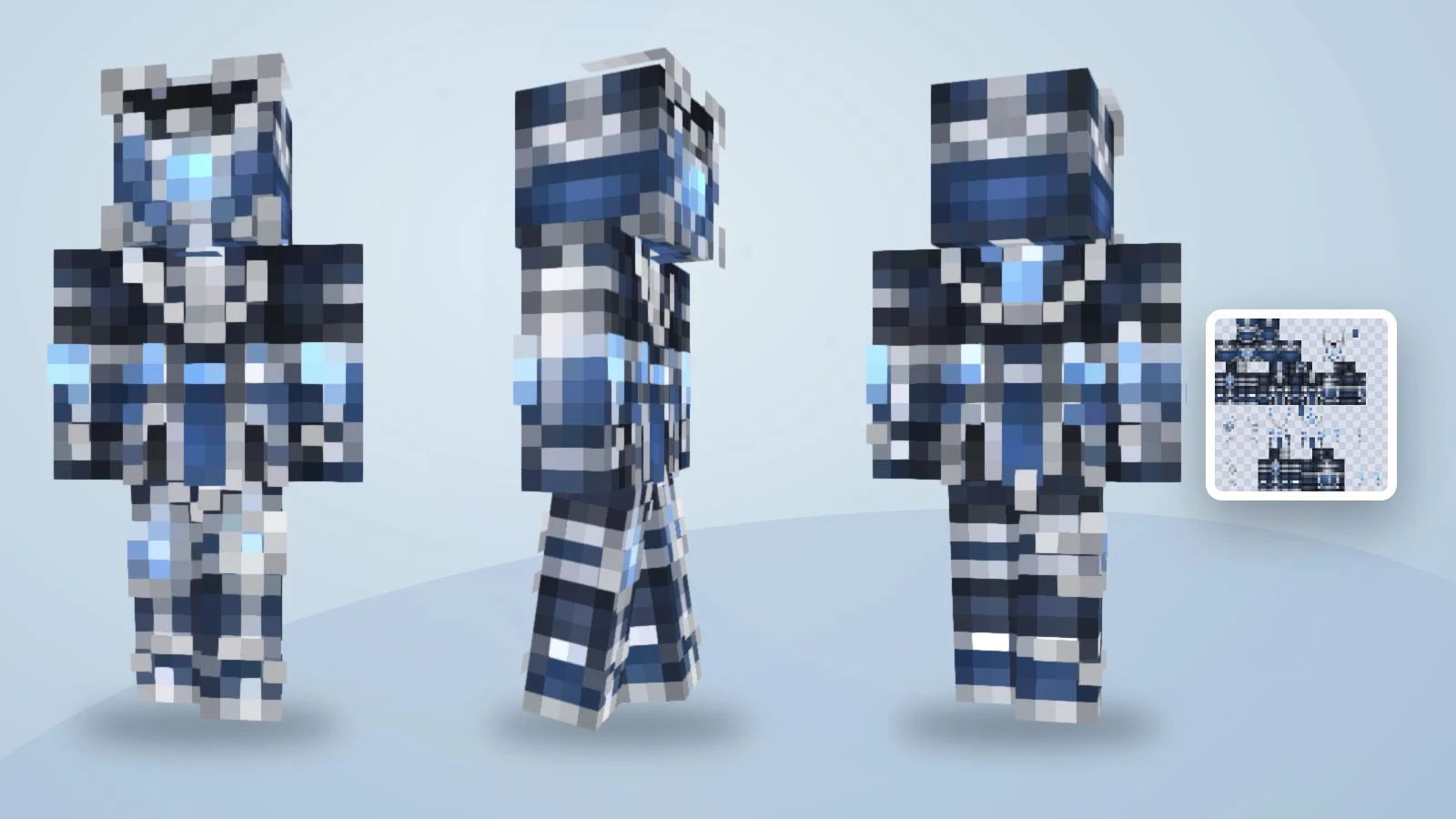
기존 텍스처 하나를 세 방향에서 보여 준 것으로 숲속 지도 제작자 프롬프트 결과가 아닙니다.
1. 텍스트 모드에서 설명 입력
영어 프롬프트를 캐릭터 설명란에 붙여 넣고 로그인하세요. 사진 업로드는 필요 없습니다. 자신의 사진으로 시작하려면 사진 모드를 선택하고 사용 권한이 있는 이미지만 올리세요.
2. 바로 생성하고 3D로 확인
텍스트 생성은 회당 5크레딧이며 별도 미리보기나 변환 구매가 없습니다. 얼굴, 등, 소매와 신발을 확인하세요. 결과는 구형 64×32를 변환한 64×64 Classic/Steve PNG로 좌우 팔다리가 대칭입니다. 서로 다른 소매를 요청해도 독립적인 좌우 텍스처가 생성되지는 않습니다.
3. 세부 사항을 편집하고 다운로드
작은 색상·픽셀 문제는 무료 편집기에서 수정하세요. 수동 편집과 내보내기는 재생성이 필요 없지만 전체 디자인을 새로 생성하면 크레딧을 다시 사용합니다. 3D 화면 캡처가 아닌 PNG를 받고 원본은 Classic/Wide로 가져오세요. Slim으로 바꿨다면 팔을 확인하고 게임에서도 같은 모델을 선택하세요. Bedrock은 기기 지원 여부도 확인해야 합니다.
만들기 전에 예제를 회전해 보세요
기존 파란 기사 스킨을 끌어 텍스처가 몸을 어떻게 감싸는지 확인하세요. 정면, 뒷면과 걷기 기능을 사용하세요. 제안 프롬프트에서 새로 생성한 결과가 아닌 기존 예제입니다.

예제 스킨을 불러오는 중…
설명을 바꿀까요, 픽셀을 편집할까요?
전체 캐릭터가 다르면 프롬프트를 바꾸고, 개념은 맞는데 작은 부분만 다르면 편집기를 사용하세요.
| 문제 | 다음 작업 | 예시 |
|---|---|---|
| 의상이 불명확함 | 옷과 색을 지정 | 초록 재킷, 크림 셔츠, 갈색 바지 |
| 등 디자인이 다름 | 뒷면을 명시 | 무늬 없는 남색 |
| 작은 장식이 너무 많음 | 주요 강조 하나만 유지 | 목도리는 남기고 글자는 제거 |
| 소매나 신발 픽셀이 틀림 | 편집기로 부분 수정 | 재생성 없이 소매 끝 칠하기 |
| 스킨 대신 그림이 있음 | 단계와 파일 확인 | 텍스트는 최종 PNG, 사진은 별도 변환 |
자주 묻는 질문
어떤 프롬프트가 유용한가요?
캐릭터 한 명, 주요 의상 색, 신발까지의 옷차림과 뒷면 특징을 지정하세요. 작은 텍스처를 고려하고 실제 결과를 확인해야 합니다.
사진 없이도 되나요?
네. 텍스트 모드는 설명으로 시작합니다. 사진 모드는 사용 권한이 있는 참고 이미지를 위한 별도 옵션입니다.
4K 스킨을 요청해야 하나요?
이 과정의 최종 파일은 64×64입니다. 큰 그림이나 PNG 확대가 올바른 텍스처 배치를 대신하거나 매핑을 수정하지는 않습니다.
펼친 텍스처 배치를 설명해야 하나요?
아니요. 외모를 설명하면 도구가 레이아웃을 처리합니다. 사용 전 파일과 3D 매핑을 확인하세요.
어떤 도구를 고를까요?
입력, 미리보기, 편집과 내보내기를 비교하세요. 디자인이 정해졌다면 텍스트 생성 후 최종 PNG를 확인하면 됩니다.
나만의 마인크래프트 스킨 만들기
Describe your character, review the preview, then create a skin you can inspect and edit.